
Two identical bounce houses return from different events. One has a reported fault; the other has completed its checks. If the warehouse records both under the same model name, the wrong unit can be sent out next. Commercial inflatable asset tracking solves that identification problem: one record follows one physical unit through dispatch, return, service and release.
The system can start in a shared spreadsheet. Its value comes from stable identifiers, linked evidence and a named person responsible for changes. This guide provides an equipment register and service-history structure. Technical work and operating limits still follow the documentation for the specific device.
Assign a unique asset ID when a unit arrives. Keep that ID even if its storage location, customer-facing name or operating status changes. A model code describes a design; an asset ID identifies the particular item you own. Three units of one model need three separate records.
Record the manufacturer's serial number separately. An internal code such as INF-0042 is an illustrative naming convention, not a factory serial number. If the serial number is missing or unreadable, record that gap and ask the supplier to resolve it; do not invent a replacement manufacturer identity.
For modular equipment, identify separately managed sections and list their parent set. Keep accessories as linked items where useful. A blower should retain its own identity when it moves between units. A planned pairing records what is assigned; it does not establish that the pairing is technically suitable.
Use one row per asset and link to documents stored elsewhere. Avoid putting a full inspection report inside a single spreadsheet cell. The register should help staff find the right evidence and identify who owns the next action.
| Field | What to record | Why it matters |
|---|---|---|
| Asset ID and factory identity | Internal code, serial number, model and supplier | Distinguishes similar-looking units |
| Reference photograph | Overall unit and readable identification label | Helps staff verify the physical item |
| Documents | Links to the applicable instructions, delivery records and reports | Keeps model-specific evidence accessible |
| Assigned equipment | Blower or pump ID, accessory-kit ID and supplier-confirmed configuration reference | Shows what should leave with the unit |
| Current custody | Warehouse bay, vehicle or event reference; responsible person | Shows where to find it and whom to contact |
| Status and reason | Available, dispatched, awaiting checks, on hold or retired; date and explanation | Prevents a booking from overriding an unresolved fault |
| Latest service event | Event ID, date and linked evidence | Connects the register to the detailed history |
Use the same structure across a mixed fleet. The product-specific document links distinguish a commercial bouncer from a bouncer-and-slide combo; staff should not copy a configuration from one simply because both fit in the same storage bag.
An inflatable maintenance log template needs more than a “last repaired” column. Keep a second table with one row per reported issue, check or service event. Link each row back to the asset ID. That preserves earlier events when a new one is added.
Useful columns are event ID, asset ID, date, reporter, event type, observed issue, operating or return reference, evidence link, action taken, responsible person and closure reference. Describe observations plainly: “zipper flap reported loose at return” is more useful than “unit bad.” A description is not a diagnosis.
Name photograph folders with the asset and event IDs. Preserve the original observation alongside later findings. If a note is corrected, record who corrected it and why rather than silently rewriting the history. Restrict edits to the people responsible for the register and keep a backup or version history.
This service history supports other decisions without duplicating them. The repair-versus-replace framework addresses the retirement decision. The register supplies the dated evidence for that review; it should not generate an automatic retirement verdict from a generic age field.
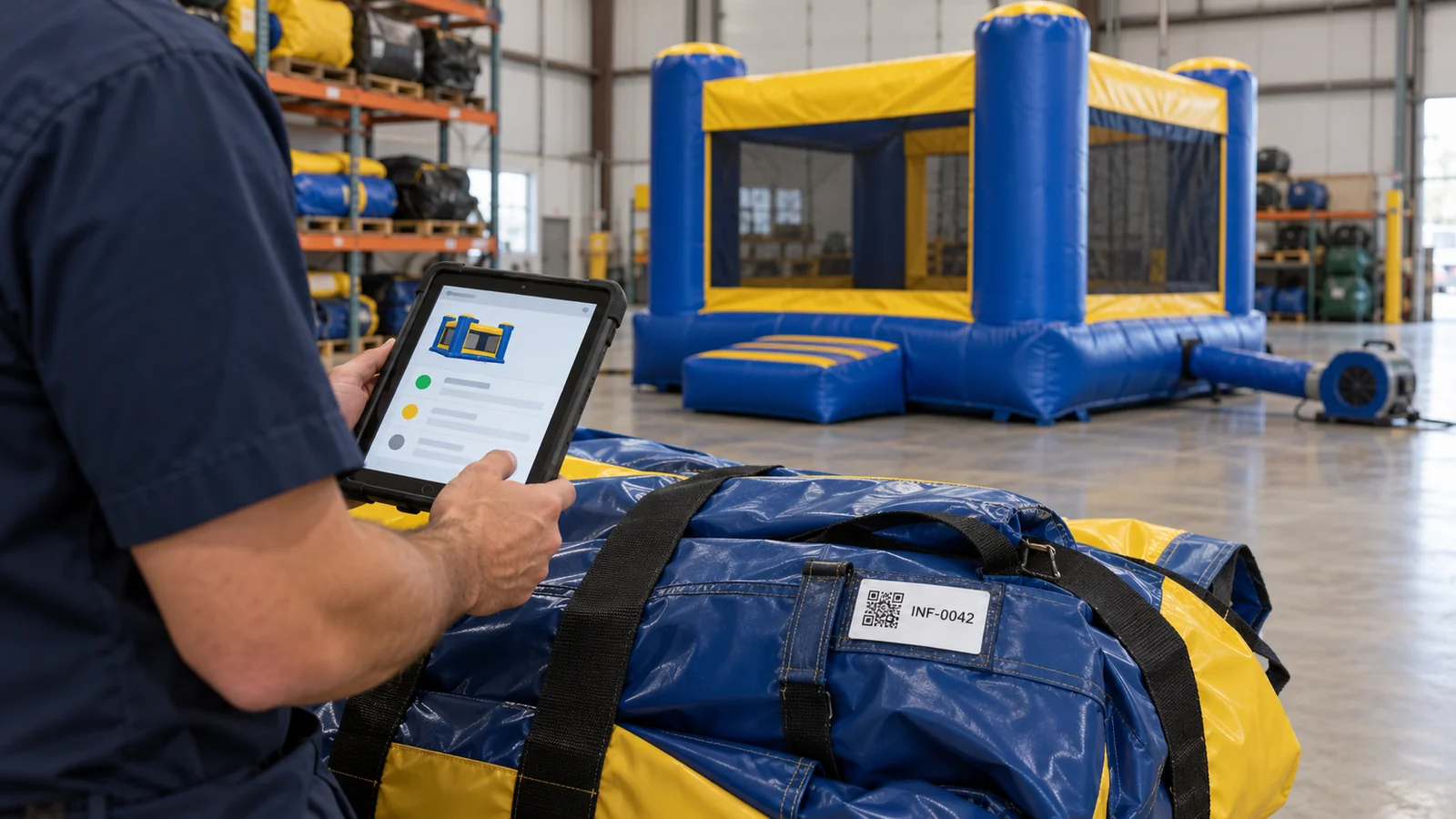
A QR code can open the correct internal asset record on a phone. Link to a stable asset page or form, not a folder that changes whenever someone reorganizes the files. Print the human-readable asset ID beside the code so the item can still be identified when a camera, connection or label fails.
Keep personal information, customer details and internal service notes behind appropriate access controls. Test the link with the account a crew member actually uses. A working administrator link is not proof that warehouse staff can access it.
An internal tracking label supplements the original markings. It does not replace the manufacturer's label, operating instructions or inspection documentation. Ask the supplier about a suitable identification method and placement; do not puncture, glue or modify structural material simply to attach a tracking tag. A labeled carry bag is a useful secondary reference, but the bag can be swapped and should not be the sole identity check.
“In the warehouse” describes location, not readiness. Use controlled statuses and a recorded reason for each change. A returned item enters “awaiting checks.” A reported unresolved defect places it “on hold.” The system should prevent either state from being treated as available merely because a customer has booked that model.
Record who is authorized under your operating procedures to release a unit, what applicable checks were completed and where the evidence is stored. Only then update its availability. A completed repair entry by itself should not silently change the dispatch status.
After a storage interval, link the applicable checks and release record to the asset. The off-season storage guide covers the storage topic; this workflow covers how you associate the resulting records with the right unit.
Before a repeat or mixed-model order ships, ask the supplier to provide a unit-by-unit identity list with model references and document links. Reconcile it with the items received. Record any mismatch as an open action instead of guessing which report belongs to which unit.
Keep purchase and warranty references in the record, but handle coverage questions through the agreed terms. A clear identity chain helps you prepare a supplier conversation; it does not guarantee that a claim will be accepted. Start with your most frequently dispatched assets, verify their records against the physical items, and extend the system once the return and release workflow works consistently.